Cloudflare Turnstile: Benefits & Setup

Every business website has at least one form: a contact form, a quote request, a login, a signup. And every one of those forms is a target. Automated bots fill them with spam, probe them for weaknesses, and bury real enquiries under junk.
For years the standard answer was a CAPTCHA: the "pick all the traffic lights" puzzle. It works, but it also makes real customers do extra work to talk to you. Cloudflare Turnstile is a newer approach that checks for bots in the background and usually asks the visitor to do nothing at all.
What Is Cloudflare Turnstile?
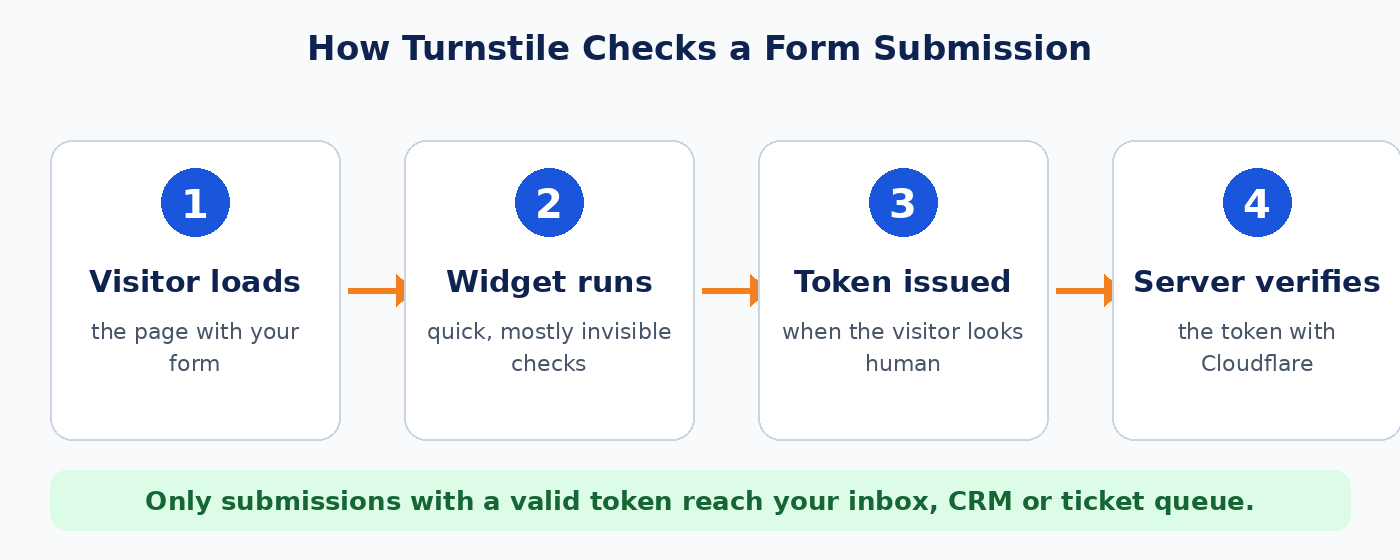
Turnstile is a free bot-protection widget from Cloudflare. You add a small piece of code to a form. When someone loads the page, the widget runs a set of lightweight browser checks and, if the visitor looks like a real person, hands back a one-time token. Your server then confirms that token with Cloudflare before it accepts the submission.
The important part is the server-side check. The widget on its own is only half the job. A bot can ignore a widget it never loads, so the form must refuse any submission that arrives without a valid token.
The Benefits for a Small Business
1. Fewer interruptions for real customers
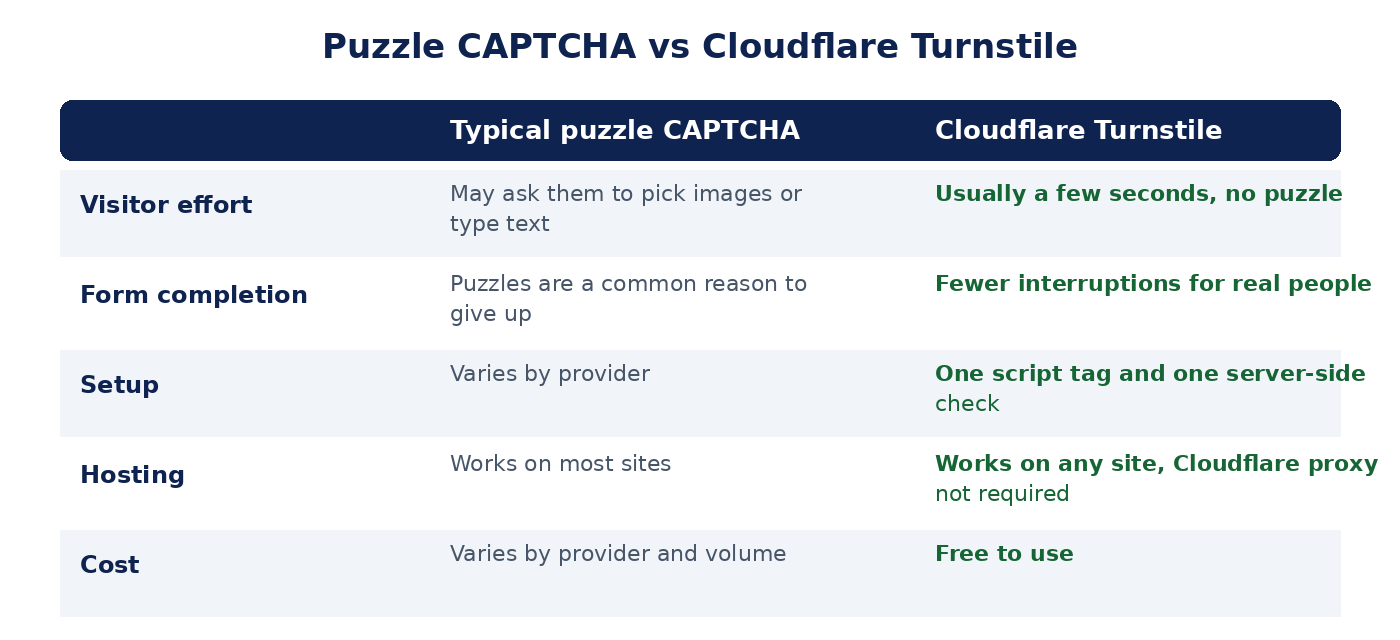
In most cases Turnstile finishes in a few seconds without asking for anything. Visitors who might have given up on a puzzle simply submit the form. If a visitor does look suspicious, Turnstile can ask for a simple interaction instead.
2. Less spam in your inbox, CRM and ticket queue
Every junk submission costs someone time. Blocking automated submissions before they reach you means your team spends its day on genuine enquiries, and your sales and support reports stay accurate.
3. Protection for login and signup forms
Spam is the mild problem. The same bots run credential-stuffing attacks against login pages and mass-create fake accounts on signup pages. Putting Turnstile in front of those forms makes automated abuse harder and slower.
4. Free to use
Turnstile is free, so protecting a form does not add a monthly line item to your budget. Check Cloudflare's current plan limits for very large deployments.
5. It works on any website
You do not need to move your site to Cloudflare or route traffic through their proxy to use Turnstile. It works on WordPress, custom-built sites, Django and other frameworks, and most website builders that let you add a code snippet.
6. A privacy-conscious alternative
Cloudflare positions Turnstile as a privacy-focused alternative to puzzle CAPTCHAs. If your business handles customer data, review Cloudflare's current privacy documentation and make sure your own privacy policy accurately describes the services your website uses.
Where It Helps Most
- Contact and quote forms, where spam hides real leads.
- Login pages, to slow down password-guessing bots.
- Account signup and free-trial forms, to stop fake registrations.
- Password-reset and newsletter forms, which are often abused to send unwanted email.
- Review and comment forms, to keep link spam out.
Why Setting It Up Properly Matters
Adding the widget is easy. Getting it right is where small mistakes cause real problems:
- No server-side check. If the form accepts submissions without verifying the token, bots simply skip the widget.
- Wrong domain settings. Each Turnstile widget only works on the hostnames listed in it. If your domain is missing, visitors see an error (Cloudflare reports it as error 110200) and cannot submit the form. We have seen this ourselves while rolling it out on our own site.
- Security headers that block the script. A strict Content-Security-Policy will stop the Turnstile script from loading unless
challenges.cloudflare.comis allowed. - No plan for failure. Visitors with aggressive content blockers, or a rare Cloudflare outage, can be locked out. A good setup decides in advance whether forms should show a fallback or ask the visitor to call.
- Secret keys in the wrong place. The secret key belongs on your server, never in page source, and should be rotated if it is ever shared.
How TechShield MSP Sets It Up for Clients
We handle the whole process so you do not have to learn the details:
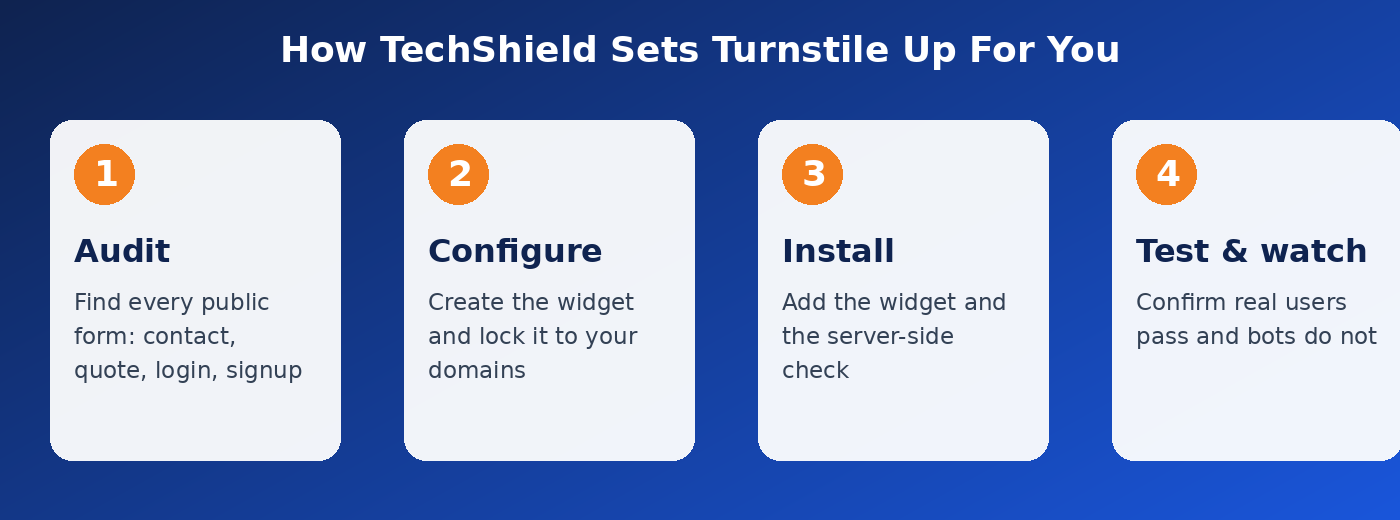
- Audit your forms. We list every public form on your site, including the ones people forget about, such as password reset and newsletter signups.
- Configure the widget. We create the Turnstile widget, lock it to your domains, and choose the right mode for each form.
- Install it with a server-side check. We add the widget to each form and make the server verify every token before accepting a submission. We also review your security headers so the script is not blocked.
- Test and monitor. We test in real browsers, confirm that genuine submissions go through and automated ones do not, and keep an eye on it afterwards.
We use Turnstile on our own website's forms, so this is a setup we run and maintain ourselves.
What You Will Need to Provide
- The address of your website and a list of any forms you know about.
- Access to your site's admin area or hosting, so we can add the code.
- A Cloudflare account (free). If you do not have one, we can help you create it.
The Short Version
Turnstile gives you spam protection that is free, quick for real customers, and works on almost any site. The benefit comes from doing it properly: a correctly configured widget, a server-side check on every form, and a plan for the edge cases.
If you would like us to protect your forms, contact us and we will take a look. You can also request a free technology assessment that covers your website forms, email security and more, or see our managed IT plans if you want ongoing help. Setting up email authentication too? Read our guide on why your emails land in spam.