Proactive Monitoring vs. Reactive Repairs: Why Catching Malware Early Costs Less
Most small businesses handle IT security the same way they handle a flat tire: they ignore it until it fails, then pay whatever it takes to get moving again. With viruses, malware and ransomware, that approach is the expensive one. The repair bill is only part of the cost. The rest is the downtime, the lost work and the customers who notice.
This post explains why proactive monitoring usually costs less than reactive repairs, and how TechShield MSP uses it to catch problems early for homes and businesses across the United States.
What "Reactive" IT Really Looks Like
Reactive support is often called break/fix. Nobody looks at your computers until something is visibly wrong: a machine is slow, files won't open, a ransom note appears, or a customer reports a strange email from your address. By then the problem has usually been running for days or weeks.
That delay is what makes it costly. Malware that goes unnoticed can steal passwords, spread to other computers on the network, or quietly encrypt files. When it finally surfaces, you are paying for an emergency response, not routine maintenance.
Where the Hidden Costs Come From
1. Emergency labor
Cleaning an infected system, checking every other device and rebuilding what was damaged is unplanned, urgent work. Urgent work is rarely cheap.
2. Downtime
If your staff can't work, you still pay their wages. Add the sales you miss while systems are offline, and a single bad afternoon can cost more than months of monitoring.
3. Data loss and recovery
If files are encrypted or deleted and there is no recent, tested backup, recovery may be slow, partial or impossible. This is why we pair monitoring with cloud backup.
4. Reputation and legal exposure
A breach involving customer information can mean notifying those customers, and in some industries it triggers regulatory obligations. Rules vary by state and industry, so check what applies to you.
5. Repeat incidents
A one-off cleanup doesn't fix why the infection happened. Without monitoring or patching, the same hole stays open.
What Proactive Monitoring Means
Proactive monitoring means a provider watches your systems continuously and acts on warning signs before they become outages. In practice, that usually covers:
- Malware and virus detection: security software on each device that is checked and kept current, with alerts when it finds something.
- Patch management: installing operating system and application updates, because unpatched software is one of the most common ways attackers get in.
- Health alerts: warnings about failing drives, full disks, backups that did not complete and devices that stopped reporting.
- Unusual activity: flags for odd sign-ins, unexpected new software and similar signs of trouble.
- Regular review: a person looking at the alerts and following up, not just software generating noise.
Why Prevention Is Usually Cheaper
Here is a simplified, illustrative example. These are not TechShield prices or guaranteed outcomes.
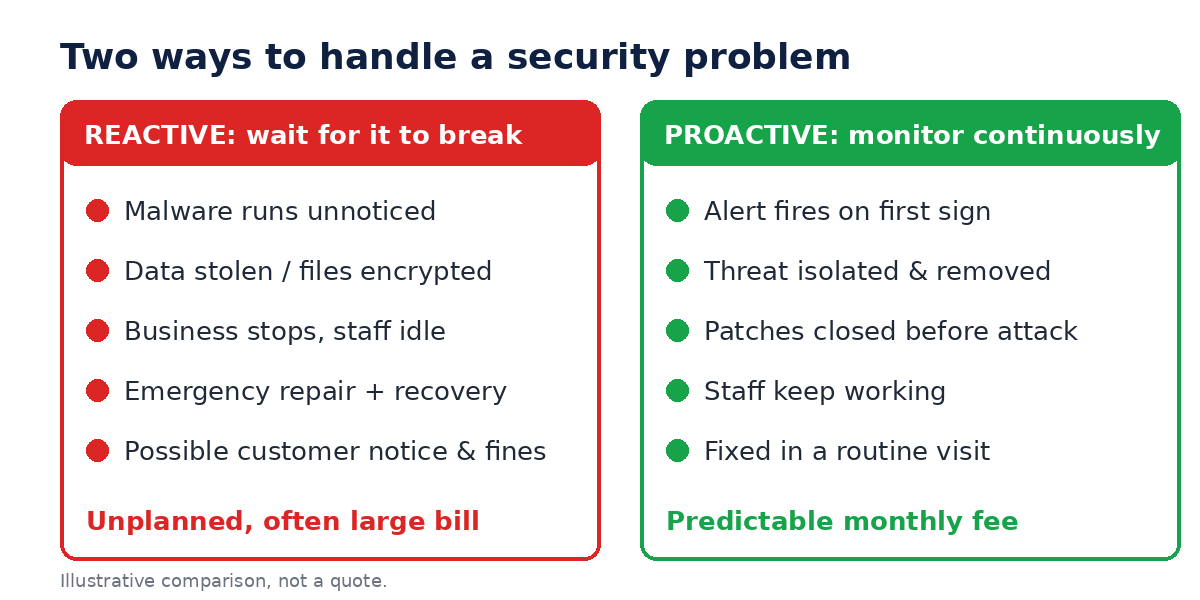
- Reactive: a malware infection spreads to several computers over a week. You lose two days of work, pay for emergency cleanup and rebuild some machines. The costs arrive all at once and you can't predict them.
- Proactive: the same threat is flagged on the first computer. It is isolated and removed during normal hours, the other devices are checked, and everyone keeps working.
The key difference is predictability. Monitoring is a known monthly cost you can budget for. A major incident is a surprise, and surprises are the expensive part. Monitoring can't promise that nothing will ever go wrong, but it shortens the time between a problem starting and someone dealing with it, and that is where most of the savings come from.
How TechShield MSP Approaches It
We treat security as ongoing maintenance rather than a one-time cleanup:
- Assess: we start by looking at what you have, what is protected and what isn't. Our technology assessment is built for this.
- Protect: security software, updates and backups are set up and kept current.
- Monitor: we watch for alerts and unusual behavior so issues are caught early.
- Respond: when something is found, we act on it, and we tell you what happened in plain language.
Because we support clients remotely, this works the same whether you are in Georgia or anywhere else in the country.
Signs You Are Paying the Reactive Price
- You only call for IT help when something is already broken.
- Nobody is certain whether all computers have current updates and protection.
- You don't have a backup you have actually tested restoring from.
- Pop-ups, slowdowns or odd emails keep returning after "fixes".
- IT costs swing wildly from month to month.
If several of these sound familiar, it is worth reading our guide to the signs your computer has been hacked and the importance of data backup.
Get Started
You don't need to commit to anything to see where you stand. Book a free IT evaluation from our home page, look at our plans and pricing, or contact us with questions. Finding a problem during a routine check is almost always cheaper than finding it after the damage is done.